Download and install on MacOS
-
Download from here macOS
-
Open a terminal window and navigate to the that folder that you downloaded the file to. e.g.:
cd Downloads
- Enter the following command to tell the OS that it is an executable:
chmod +x EX-Installer-macOS
- Run the installer with the following command:
./EX-Installer-macOS
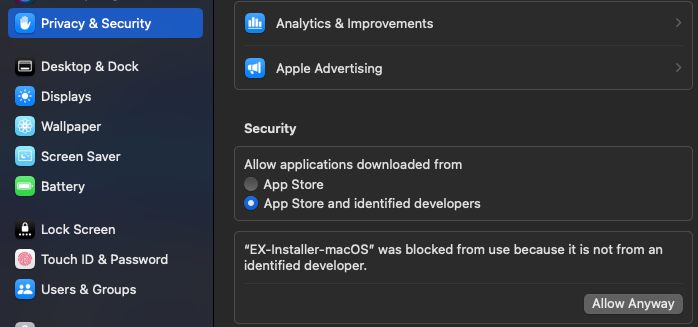
On later macOS versions, go to Privacy & Security in System Settings, and scroll down to Allow applications downloaded from "App Store and identified developers" and then when EX-Installer is blocked, click "Allow Anyway"
On Apple Silicon Macs (M1, M2, Neo etc.), you may need to install Apple's Rosetta software in order to run version 0.20 or earlier of EX-Installer.
Install Apple's Rosetta with the following command:
softwareupdate --install-rosetta
Then retry running EX-Installer. Note that the Rosetta translation means that EX-Installer will take a good long while to start. Please be patient!