Display Track Status on OLED
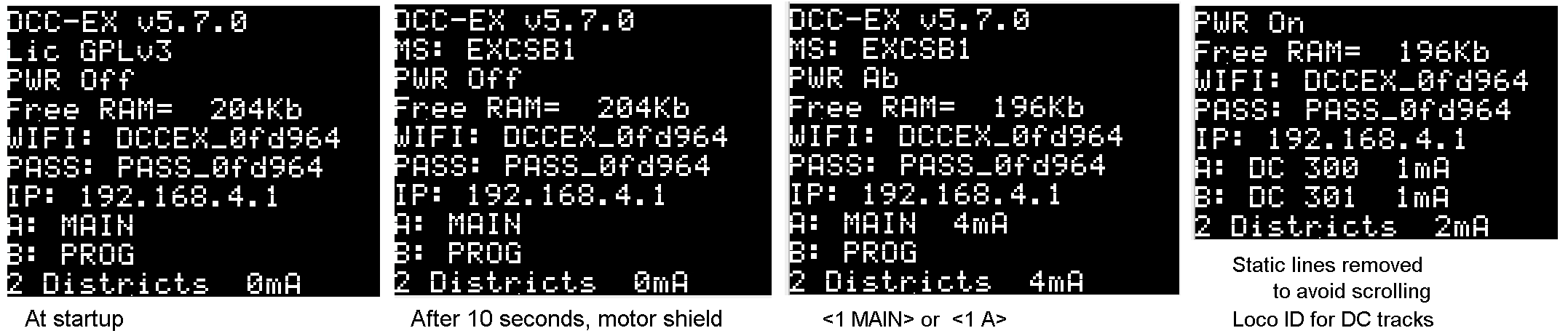
To display track status, add a line in myAutomation.h
#include "myTrackStatus.example.h"
If using Mega, a line will be needed in config.h to allocate memory for additional lines on the first display.
#define MAX_CHARACTER_ROWS 17
9 plus number of tracks; 17 for 8 tracks. CSB1, ESP32-WROOM and Nucleo-F4 have this setting as default.
In addition to displaying track status, myTrackStatus.example.h will update the second line on the display, to show the motor shield type after 10 seconds.
myTrackStatus.example.h can be used by adding the #include line in myAutomation.h, or you can copy/rename the file in your backup folder and customize it so that the information is displayed on a different screen.
myAutomation.h
// myAutomation.h - as used in the above example

#include "myTrackStatus.example.h"

AUTOSTART
SET_TRACK(A,MAIN)
SET_TRACK(B,PROG)
POWEROFF         // power command follows change in track mode
  DELAYMINS(2)   // do not change defaults for 2 minutes
  SCREEN(0, 0, "")    // clear two static rows
  SCREEN(0, 1, "")    // to avoid scrolling
DONE
myTrackStatus.h
Contents of the example file -- suggested for review/reference on how various EXRAIL commands have been used.
// myTrackStatus.example.h

// Reporting power status and mA for each track on the LCD
HAL(Bitmap,8236,1) // create flag 8236
AUTOSTART DELAY(5000)
 ROUTE("TRACKSTATUS"_hk, "Resume/Pause JL Display")
  IF(8236)
    RESET(8236)
     ROUTE_CAPTION("TRACKSTATUS"_hk, "Paused") ROUTE_INACTIVE("TRACKSTATUS"_hk)
      SCREEN(0, 8, "Track status paused")
      SCREEN(0, 9, "")
      SCREEN(0,10, "")   // several blank lines as needed
      SCREEN(0,11, "")
      SCREEN(0,12, "")
      SCREEN(0,13, "")
      SCREEN(0,14, "")
      SCREEN(0,15, "")
      SCREEN(0,16, "")
      PRINT("to pause/resume: </START TRACKSTATUS> \n")
    DONE ENDIF
  SET(8236)
   ROUTE_CAPTION("TRACKSTATUS"_hk, "Running") ROUTE_ACTIVE("TRACKSTATUS"_hk)
    PRINT("Resume JL Display")
   FOLLOW("PAUSETRACKSTATUS"_hk)
  SEQUENCE("PAUSETRACKSTATUS"_hk)
   PARSE("<JL 0 8>")  // screen 0  start on line 8
    PRINT("to pause/resume: </START TRACKSTATUS> \n")
    DELAY(3000)
  IF(8236) FOLLOW("PAUSETRACKSTATUS"_hk) ENDIF
  DONE
// ************ End OLED JL Display Track mA Amperage ************** //

// Display motor shield after 10 seconds
AUTOSTART
  DELAY(10000)
  STEALTH(StringFormatter::lcd(1, F("MS: %S"), DCC::getMotorShieldName());)
DONE
Lines displayed
Options to adjust lines reported. On the primary display, SCREEN 0, blank lines are not displayed.
There are multiple ways to avoid an extra line on the display; perhaps you just want the display to only contain 8 lines and not scroll.
a. One way to eliminate the Total line is to blank the line.
Figure out which line is used. If the <JL command results in 3 lines, starting on line 8, then write a blank line on line 10.
.. in your customized myTrackStatus.h file.
    PARSE("<JL 0 8>")  // screen 0  start on line 8
    SCREEN(0,10, "")  // blank to remove total
b. use/change the parameter in config.h
#define MAX_CHARACTER_ROWS 10
.. which results in lines 0-9 being available for use; line 10 is not displayed.
c. If it is the scrolling, and you want fewer lines displayed, select any of the static lines to blank
    AUTOSTART
    SET_TRACK(A,MAIN)
    SET_TRACK(B,PROG)
      DELAYMINS(2)   // do not change defaults for 2 minutes
      SCREEN(0, 0, "")
      SCREEN(0, 1, "")
    DONE